
Using the Platform in the First 30 Days: A Beginner's Checklist


Introduction
In today’s fast-paced air charter industry, efficiency, accuracy, and real-time coordination are critical. Avi-Go is designed specifically for air charter brokers and operators to simplify complex workflows—from managing client requests to quoting, and flight tracking—all within one unified platform. Whether you're handling on-demand charters or managing operator fleets, Avi-Go brings clarity and control to your daily operations.
The first 30 days using any new platform are crucial. They lay the foundation for long-term productivity, team adoption, and overall ROI. This is especially true for charter operations, where smooth transitions mean uninterrupted client service and operational continuity.
To help you get the most out of Avi-Go from day one, we've created this step-by-step 30-day checklist. It’s a focused onboarding guide tailored to your operational needs—so you and your team can hit the ground running and start delivering more value, faster.
Week 1: Getting Started with Avi-Go
Account Setup and Personalization
Your first step in using Avi-Go effectively is to ensure your account is fully set up and tailored to your operational needs. A well-configured account minimizes friction, improves team communication, and lays the groundwork for automation and reporting.
Complete Profile Information
Start by filling in all relevant company and user details. This includes:
- Company name, logo, and contact details (these appear in client-facing documents).
- Individual user profiles for each team member, with defined roles and access levels.
- Aircraft fleet data, and operational certificates if applicable.
- Accurate and complete information ensures smoother quoting, more personalized client communications, and fewer data entry errors later on.
Set Up Notification Preferences
Avi-Go offers flexible notification settings to keep you updated without overwhelming your inbox. Customize:
- Email and in-platform notifications for new booking requests, approvals, and schedule changes.
- Alerts for flight updates and team activity.
Tailoring your notification preferences helps your team stay responsive and proactive without constant manual oversight.
Platform Navigation Basics
Once your account is set up, the next step is getting familiar with the Avi-Go interface. The platform is designed for speed and clarity, so mastering the layout early ensures your team can work confidently from day one.
Overview of the Dashboard
The Avi-Go dashboard serves as your operational control center, surfacing the most important data right when you need it:
- Inquiry Overview: Quickly review the status of your pipeline with real-time data on new inquiries, ongoing bookings, and canceled requests. This allows you to prioritize responses and manage client expectations proactively.
- Global Flight Safety Report: Stay informed with industry-wide safety insights to support compliant and risk-aware decision-making.
- Weekly BizAv Performance Report: Get a pulse on overall business aviation trends, market shifts, and operational benchmarks to help guide strategy.
- Flight Distribution Insights: Understand how your inquiries are distributed across routes, regions, or aircraft types—helping you identify demand patterns and optimize your offerings.
- Operator/Broker Performance: Monitor your relationships with operators through feedback, reliability metrics, and turnaround times to build stronger, data-backed partnerships.
Each dashboard component is built to give charter professionals real-time insight and actionable intelligence to optimize performance at both the operational and strategic level.
Initial Training Resources
To ensure a smooth onboarding experience, Avi-Go offers a range of self-guided and interactive training tools designed to help you and your team become productive quickly.
Help Centre & User Manual
Start with the Avi-Go Help Centre, your go-to resource for detailed documentation. It includes:
- A complete step-by-step manual covering every feature and module.
- Practical guides for common tasks like creating inquiries, assigning operators, and managing client profiles.
- Clear, structured content so team members can learn at their own pace or refer back when needed.
Whether you're troubleshooting or learning a new feature, the Help Centre supports consistent, scalable team adoption.
Interactive Product Tour
For a hands-on experience, click the View Demo button at the top right corner of the Avi-Go interface. This interactive walkthrough visually guides users through the core functions of the platform:
- Learn where key tools are located.
- Understand how workflows are structured.
- Follow practical use cases in a live, visual format.
This is especially useful for new users who prefer learning by doing rather than reading documentation.
Week 2: Advanced Features and Optimization
By your second week on Avi-Go, it’s time to move beyond the basics and start leveraging the platform’s advanced features to improve your quoting accuracy, client communication, and operational decision-making. This is where Avi-Go becomes more than a workflow tool—it becomes your strategic advantage.
Utilizing Reporting Tools
Monitor Booking Trends
Using the dashboard’s visual analytics modules, you can monitor how your charter activity is evolving in real time. The Avi-Go Dashboard allows brokers to:
- Identify popular routes, preferred aircraft types, or frequent client profiles.
- Spot demand surges across specific regions or seasons.
- Adjust pricing or aircraft recommendations based on recent inquiry patterns.
This high-level visibility helps brokers make more targeted decisions, forecast upcoming needs, and respond faster to shifts in demand.
Generate Performance Reports
Avi-Go simplifies reporting through streamlined data collection in both the inquiry management and quotation management consoles. You can easily extract actionable insights such as:
- Inquiry volume by status (new, ongoing, canceled).
- Quotation activity, allowing you to measure how many quotes were generated, sent, or accepted.
- Distribution of inquiries across different operators or aircraft categories.
These tools give team leads and managers a clear picture of productivity, pipeline health, and quote efficiency—all essential for improving turnaround times and win rates.
By the end of Week 2, you’ll have a deeper understanding of how Avi-Go supports not just operations, but strategy. These insights give you the edge to serve clients more intelligently—and close deals faster.
Week 3: Customizing Client Interactions
With the foundations in place and advanced features explored, Week 3 is all about refining how you engage with clients. This is where Avi-Go becomes a tool not just for managing operations, but for elevating your client experience and winning more business.
Tailored Trip Proposals with Aircraft Search + Flight Analytics (Reinforced)
At this stage, brokers should be confidently using Aircraft Search along with Avi-Go’s flight analytics engine to craft smarter trip proposals. These tools empower you to:
- Search aircraft by availability, performance specs, and operator history.
- Analyze route efficiency, fuel cost optimization, and turnaround times.
- Provide clients with well-informed, data-backed recommendations that go beyond availability and price.
When paired with strong client insights, these tools help create proposals that are more strategic, personalized, and competitive.
Quote Customization Tool: Presenting Smart, Branded Proposals
Avi-Go’s Quote Customization Tool is a key feature for standing out in a crowded market. Brokers can build:
- Branded, client-facing proposals with custom messaging and visuals.
- Consolidated quotes that present multiple aircraft options side by side—complete with aircraft images, pricing breakdowns, and highlights.
- Personalized remarks to address specific client preferences or past feedback.
This professional, visually rich presentation helps you position your offering as premium, well-prepared, and client-first.
Week 4: Review and Continuous Improvement
The first 30 days with Avi-Go lay the foundation—but long-term success comes from consistent evaluation, learning, and adaptation. Week 4 is about assessing your progress, listening to your team, and setting a clear roadmap for maximizing the platform’s value over time.
Feedback Collection and Assessment
Gather Team Feedback on Platform Usage
Encourage your team to share honest feedback about their experience with Avi-Go so far. Focus on:
- Ease of use and daily workflow alignment.
- Any friction points or areas where additional guidance is needed.
- Which features have delivered the most value—or gone underused.
Consider holding a brief internal review session to capture this input collectively. A team-centric approach ensures buy-in and highlights practical improvement areas.
Identify Areas for Improvement or Additional Training
Once feedback is gathered:
- Revisit the Help Centre or schedule focused walkthroughs on underutilized tools.
- Use Avi-Go’s interactive demo again to clarify specific modules.
- Assign internal "champions" to support others in areas they’ve mastered.
This keeps the learning cycle active and scalable.
Setting Long-Term Goals
Define KPIs for Platform Utilization
Now that your team has completed the onboarding phase, establish clear performance indicators to measure the platform’s ongoing impact. For example:
- Number of inquiries processed per week.
- Time-to-quote or booking conversion rates.
- Aircraft/operator usage patterns and client satisfaction.
These KPIs will help you evaluate Avi-Go not just as software, but as a business asset.
Plan for Regular Reviews and Updates
Set a cadence for internal platform reviews—monthly or quarterly—to:
- Track performance metrics.
- Re-align usage goals with operational strategy.
- Stay agile as your business scales or shifts.
Staying Updated with Avi-Go
Subscribe to Updates and Resources
Avi-Go is constantly evolving. Make sure your team stays ahead by:
- Subscribing to product newsletters and release notes for new features or enhancements.
- Keeping notifications turned on for system tips and updates.
By the end of Week 4, your team should feel confident, connected, and aligned on how Avi-Go supports your broader charter goals—not just as software, but as a core part of your business growth strategy.
Conclusion
Your first 30 days with Avi-Go lay a strong foundation for long-term success. Each week—from setup and training to quoting and optimization—equips your team to operate smarter and serve clients better.
Stay engaged, keep exploring features, and track your progress regularly to maximize results.
Want updates, tips, and feature releases?
Subscribe to the Avi-Go Newsletter to stay informed and ahead.
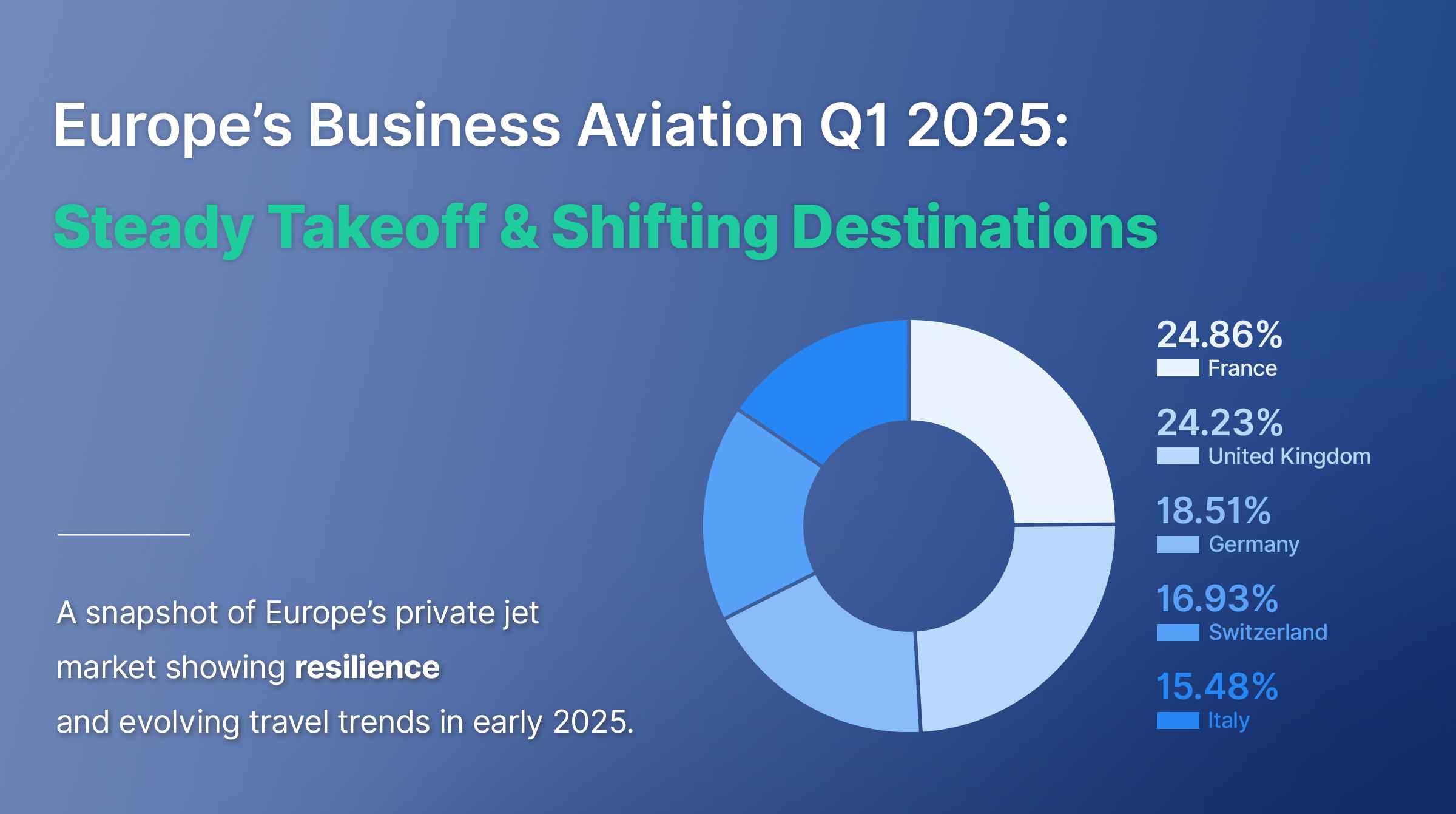
Q1 2025 Snapshot: What’s Driving Europe’s Business Aviation Market?

Exploring Innovation and Sustainability at EBACE 2025: Key Takeaways for the Air Charter Marketplace

Private Jet Charter Cost Estimator and Airline Price Predictor
Ready to Supercharge
Your Business Aviation Tech Stack with AI and Data?
Sign up free and start using the tools available in your chosen plan.
Discover how our aviation technology helps you work more efficiently and grow with confidence.
Subscribe to the Avi-Go Newsletter
Business aviation data, insights, and trends — trusted by 10,000+ professionals worldwide.