
Streamline Your Inquiry Process
Streamline your inquiry management with Avi-Go's unified platform. Effortlessly track and handle inquiries from the Aircraft Search and Empty Legs to optimize your workflow.
Send Inquiries
- Choose your preferred options from Aircraft Search or Empty Legs, then send your inquiries directly to operators.
Access Your Inquiries
The way you access inquiries depends on your user role:
- For Brokers: Navigate to the left sidebar and click on Inquiry to view all inquiries sent through Aircraft Search and Empty Legs.
- For Operators: In the left sidebar, click on Order, then select Inquiry from the submenu to manage all sent requests.
This view allows you to track and manage your inquiries efficiently.
Manage Your Inquiries: Step-by-Step
Step 1. Search or Filter Your Inquiries
Search Inquiries:
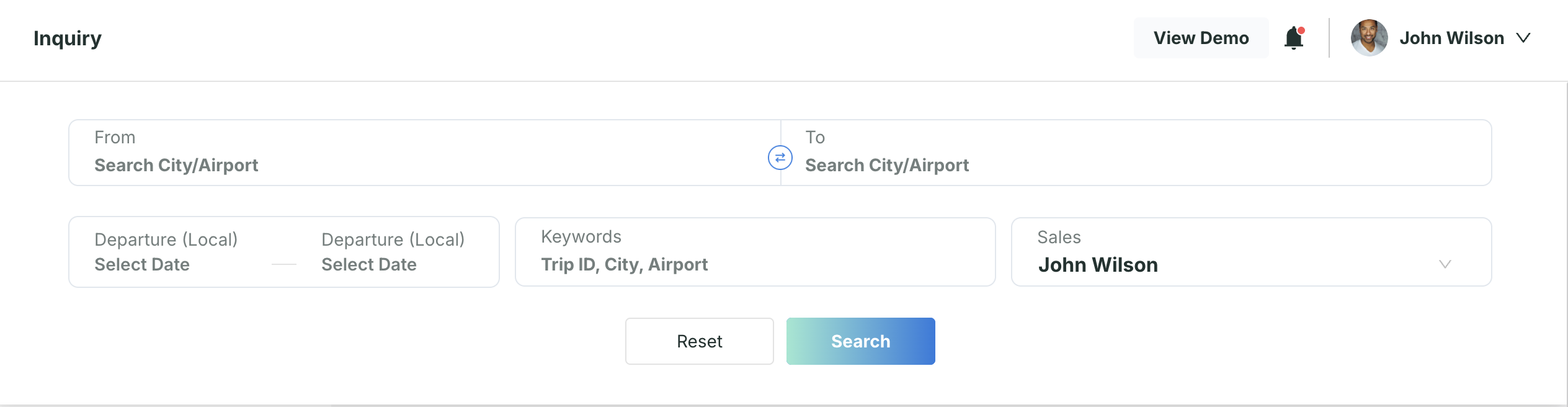
- Click the search icon in the top-right corner to reveal the search bar.
- Input order details such as departure/arrival city or airport, departure date, and keywords.
Inquiry Status Tab:
You can view inquiries by their status in the following tabs:
- Ongoing : Inquiries are in progress, collecting quotes from operators.
- Accepted : Quotes accepted and waiting for customization and download.
- Cancelled : Order canceled and will not proceed.
Left-Side Card View is Sorted by:
- Create: Earliest
- Create: Latest
- Departure: Earliest
- Departure: Latest
Followed Orders:
- Click the star icon to display only the orders you have marked as follows.
Step 2. Manage Your Inquiries
- Select Your Inquiry: Select an inquiry from the left-side list to view its details in the right-side panel.
- View Inquiry Details: The right-side panel shows the order details, including the current status, order ID, creation time, and trip information.
Use the "Follow" button to mark important trips for easy tracking.
You can also cancel the trip if needed. Operators who sent you the quotations will be notified automatically.
Step 3. Manage Available Quotes
You can manage and review all operator-provided quotations directly within the Operator Quotes tab, located beneath the order details on the Inquiry page.
Operator Quotation Tab
This section helps you stay organized and take action on available quotes:
Quotation Status
Quotes are automatically categorized into three statuses:
- Quoted – The operator has submitted a quote.
- Unquoted – Awaiting a quote from the operator.
- Rejected – The quote was declined or marked unsuitable.
Refresh Quotes
Click Refresh button at any time to load the latest updates from operators.
Accept Operator Quotes
After reviewing the quoted options, you can select one or more operator-submitted options to move forward with creating a client proposal.
- To accept a quote, simply click the Accept next to the preferred options.
- You can also include manually added quotes by clicking + Extra Quote to enter external or offline offers.
Communicate with Operators
Use the Message button next to each quote to chat directly with operators for clarification or additional details.
Search for More Options
If no quote meets your needs, click Rerun Search to launch a new search based on your original inquiry criteria.
Step 4. Create and Send a Client Proposal
Once you’ve accepted or added the necessary quotes, follow these steps to create a professional client proposal:
- Click Create Your Quote.
- Adjust the sales price using a fixed amount or a percentage markup.
- Select the quotes you'd like to include and click Next.
- Upload your company logo and add custom notes or remarks to each quote.
- Name your proposal, review all details, then click Save & Download.
All downloaded proposals are saved in the Your Quotes tab, where you can re-download or delete them as needed.
Step 5. Upload Contract and Get Your Incentive
Once your client confirms the booking and you've finalized terms with the operator:
- Upload the signed contract between you (the broker) and the operator directly via the platform.
- Avi-Go will review the agreement to verify the transaction.
- Upon approval, you’ll be eligible for Avi-Go’s 0.5% incentive as part of our broker reward program.
Deal complete — congratulations on successfully closing with Avi-Go!
Subscribe to the Avi-Go Newsletter
Business aviation data, insights, and trends — trusted by 10,000+ professionals worldwide.