
Unlock Enhanced Insights with Flight Analytics
We're excited to introduce Flight Analytics, a powerful tool designed to elevate your aircraft searches. With each trip search, this feature delivers a comprehensive Flight Analytics Report , enabling smarter, faster, and more informed decisions.
Why Choose Flight Analytics?
Every time you conduct an aircraft search on Avi-Go, you'll receive an AI-powered Flight Analytics Report automatically. This advanced feature doesn’t just present data—it transforms it into actionable insights . With a complete view of your flight options, from route information to real-time operational alerts, you'll make smarter decisions.
What You'll Get
Each Flight Analytics Report includes critical insights, which may vary depending on the specific route:
- Route Condition Indicator : Leverage visual cues—green (Nice), yellow (Attention), and red (Caution)—to quickly assess flight routines, with AI analyzing key factors like route, weather, airspace, and exchange rates for efficient decision-making.
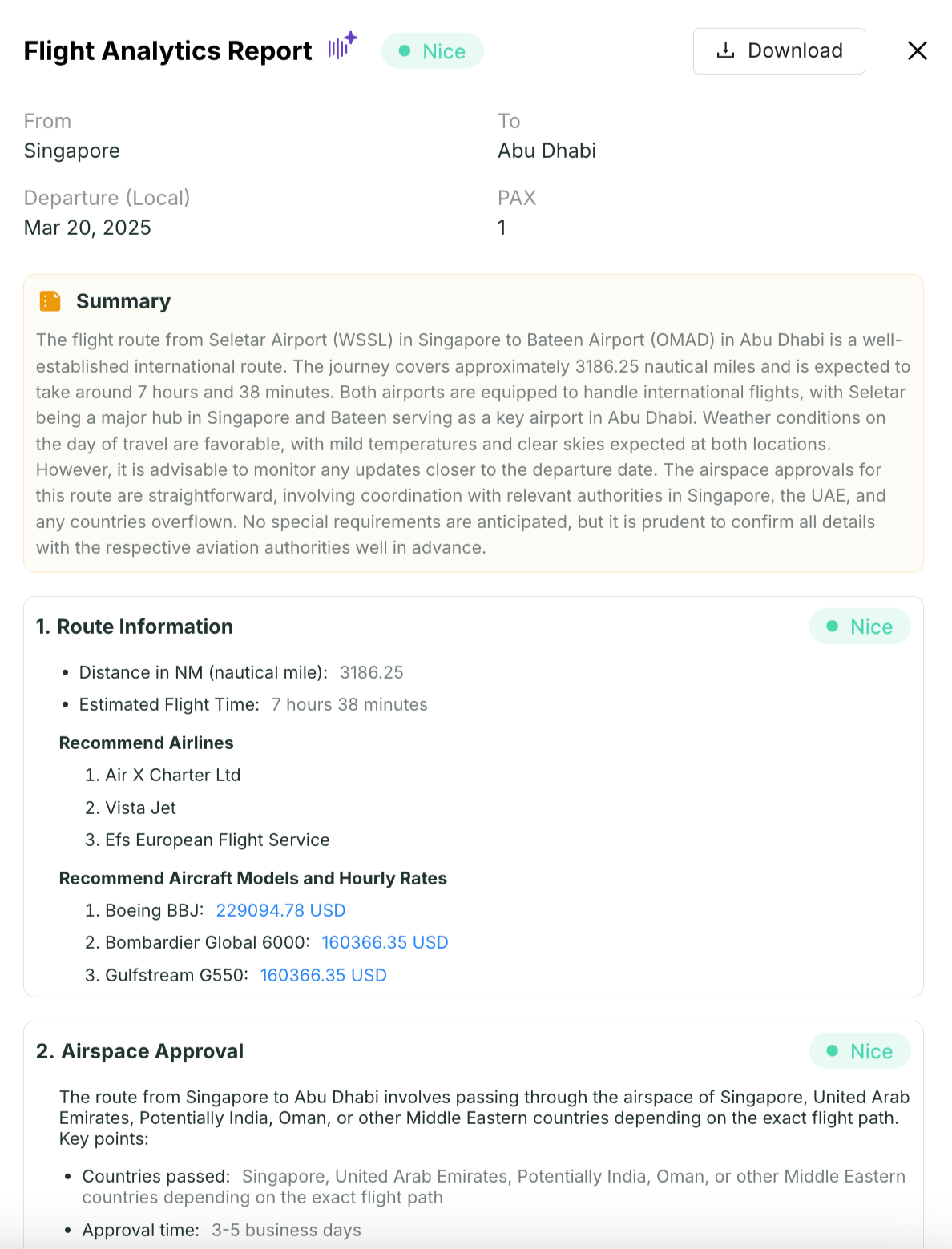
- Route Distance & Estimates: Get accurate route distances, estimated flight times, and charter pricing to plan with precision.
- Real-Time Airport Data: Access up-to-date details about departure and arrival airports, including runway availability and FBO providers.
- Weather Forecasts: Anticipate potential disruptions with real-time weather reports for both departure and arrival locations.
- Aircraft Insights & Pricing: Discover the most popular aircraft and business aviation companies for your route, along with estimated charter costs.
- Regulatory Guidance: Understand the necessary airspace approvals and permits for your flight, covering multiple jurisdictions.
- Cost Efficiency: Stay informed on key economic factors like oil prices and currency exchange rates to optimize flight costs.
How to Make the Most of this Feature
- Enter trip details in the Aircraft Search tool.
- Click Search to perform your aircraft search.
- Locate the Flight Analytics Report in the top left corner of the search results page.
- Click View Report to access the full report.
- Download and share the report with your team by clicking Download.
Frequently Asked Questions
- What if I can’t see the full Flight Analytics Report?
- Ensure you’re logged in and your account is verified. If you still cannot see the full report, please get in touch with our support team simply by clicking here.
- Can I customize the report?
- The report currently includes standardized items, but we're working on updates that may allow for more customization in the future.
- Does filtering search results affect the Flight Analytics Report?
- No, the report is generated based on the trip details you enter in the Aircraft Search box. While applying filters will change the search results, the content of the report remains unaffected.
- How often is the data updated?
- Flight Analytics pulls real-time data to ensure that you always have access to the most accurate and up-to-date information.
Get Started Today!
Don’t miss out on the benefits of Flight Analytics. Join Avi-Go now and see how this cutting-edge feature can transform your aircraft searches and enhance your client interactions.
Subscribe to the Avi-Go Newsletter
Business aviation data, insights, and trends — trusted by 10,000+ professionals worldwide.