
Maximize Empty Leg Benefits
Welcome to Avi-Go’s Empty Legs feature! This tool helps brokers find cost-effective flight options by turning empty legs into revenue-generating opportunities, while operators can increase aircraft utilization and optimize their routes.
What are Empty Legs?
Empty legs, also known as one-way charter flights , occur when an aircraft returns to its base or repositions for its next flight without passengers. Avi-Go’s Empty Legs feature simplifies the process of listing and finding these flights, providing real-time updates and detailed listings to brokers and operators alike.
Browse
What are Empty Legs?
Use the Empty Legs Feature as a Broker
Maximize Fleet Utilization as an Operator
Tips for Maximizing the Use of Empty Legs
Use the Empty Legs Feature as a Broker
Step 1. Access the Empty Legs Page
- Log into your Avi-Go account and click "Empty Legs" in the top navigation bar.
Step 2. Find Suitable Empty Leg Flights
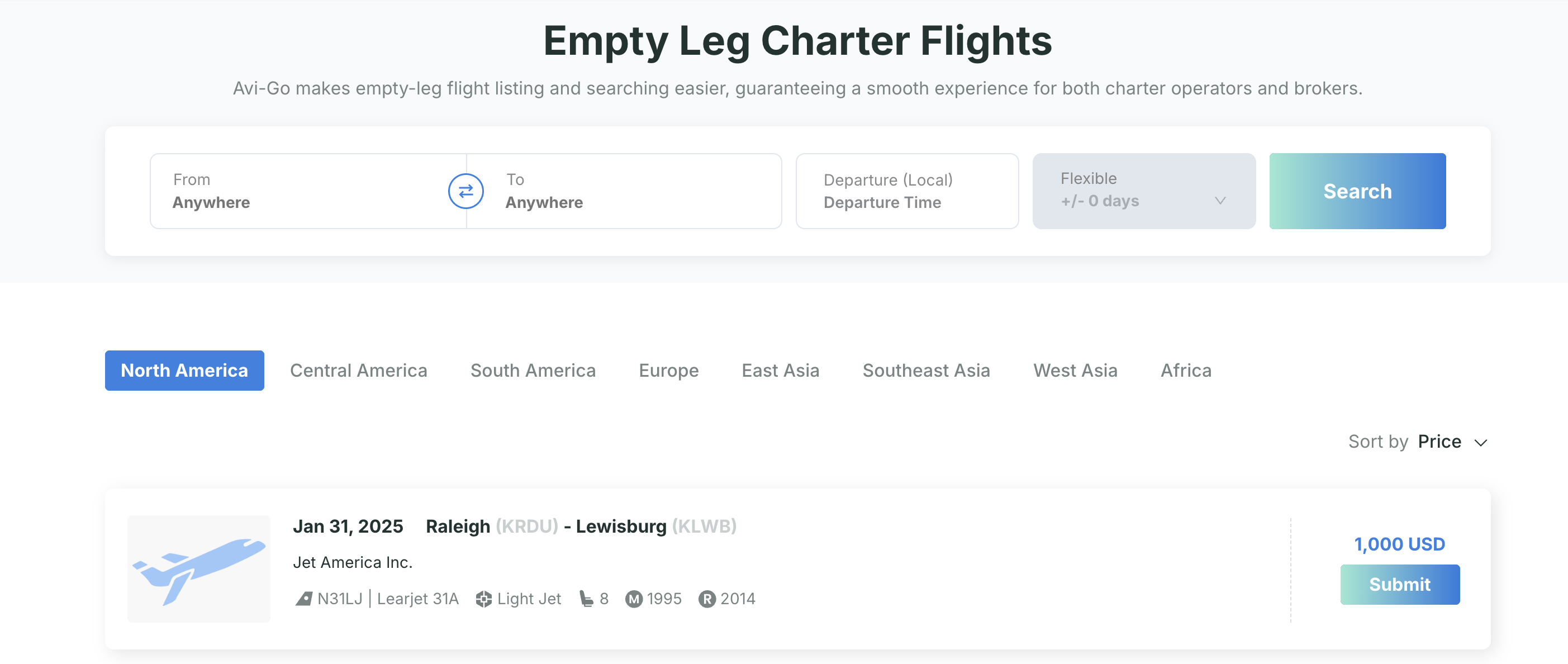
- Search by Criteria : Use the search bar to fill in the departure and arrival locations, preferred departure time , and flexible days to find aircraft that best match your needs.
- Browse by Region : Alternatively, explore available empty legs categorized by regions . You can filter by price or last updated time to find the most relevant options.
Step 3. Review Flight Details and Submit Your Request
- Select Your Preferred Flight: Review the detailed information about each available flight, including the departure date, departure city, destination, operator name, carrier, aircraft type, in-flight amenities, and more.
- Specify Your Request: If the flight matches your preference, click the " Submit " button to proceed to the " Submit a Request " page. Here, you can confirm the departure time that fits your needs, verify all the relevant details, and enter any specific remarks in the notes field to provide additional information to the operator.
- Submit Your Inquiry : Once you've reviewed the details and added any necessary remarks, click the ‘ Submit ’ button to send your request.
Step 4. Track Your Inquiry
- After submitting your request, visit the Inquiry Management Panel to track responses from operators. This allows you to manage your inquiries and ensure you provide the best deal for your clients.
Maximize Fleet Utilization as an Operator
Step 1. Access the Empty Legs Page
- Log in and click ‘Empty Legs’ on the top navigation bar.
Step 2. Manage Your Listings
- Add New Empty Leg Flight : On the "My Post " page, click " Add Legs " to add a new empty-leg flight. Enter details such as aircraft model, departure and arrival locations, departure time, and quoted price. Once completed, click " Confirm" to post the listing. You can also add several legs at the same time.
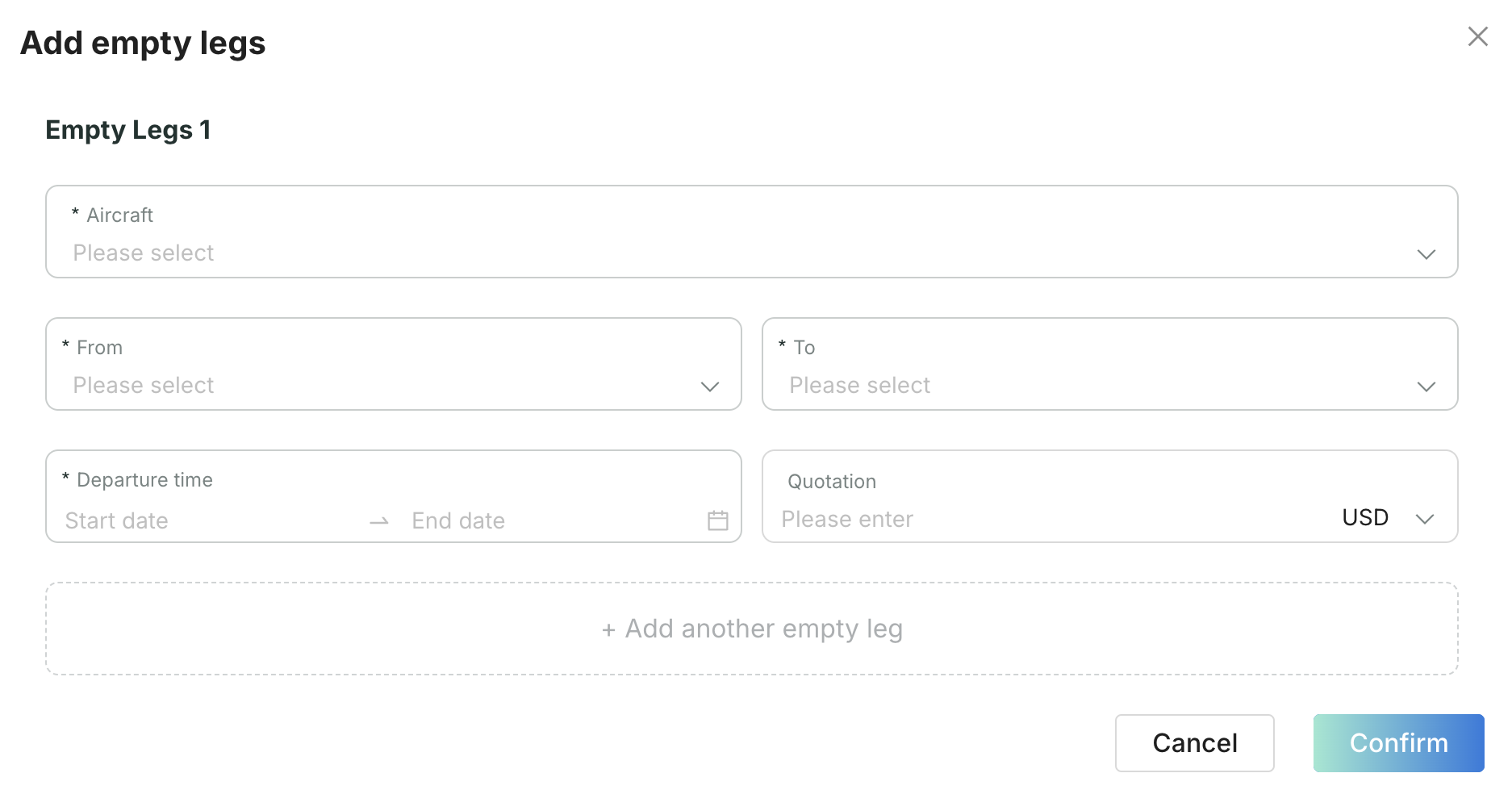
- Edit, Delete, or Duplicate Existing Legs: You can edit the details of any existing empty legs, delete posted listings, or easily duplicate them for similar flights.

Tips for Maximizing the Use of Empty Legs
For Brokers
- Leverage Alerts: Set up notifications for new messages and quotations to act quickly on opportunities.
- Stay Updated: Regularly check real-time listings to catch the empty-leg opportunities.
For Operators
- Frequent Listings: Regularly update and list empty-leg segments to maximize exposure.
- Optimize Routes: Plan aircraft schedules to include potential empty-leg flights for better marketing.
Subscribe to the Avi-Go Newsletter
Business aviation data, insights, and trends — trusted by 10,000+ professionals worldwide.